Free YouTube Karaoke.
Zero Setup.
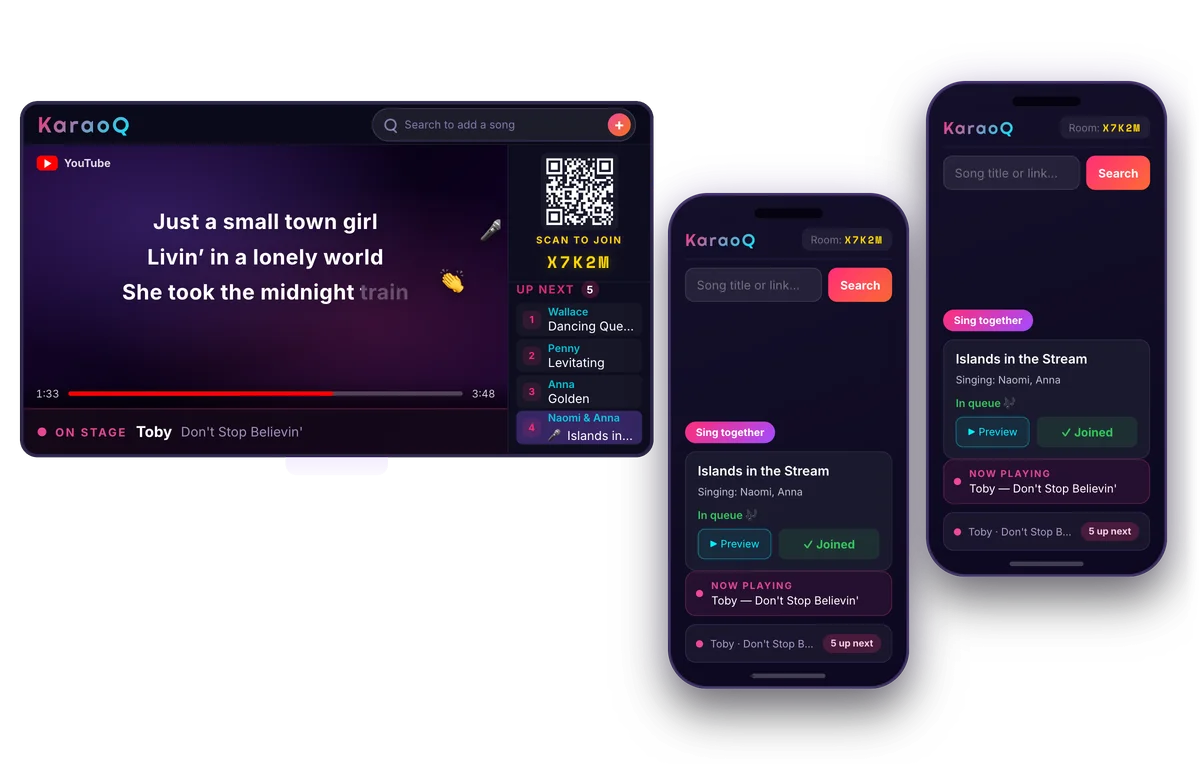
Hosting karaoke night has never been easier. Guests add songs and cheer from their phones, no account or setup required.
Free to host, free to join. No account needed.
Karaoke night, everywhere
KaraoQ brings people together around the world, through music.
How It Works
Three steps, under a minute — whether it's two friends or a whole bar.
Start a Room
One tap gets you a room code and QR — no accounts, no downloads, no sign-ups. Add the first song yourself or share the code around. And if you step away mid-night, your room and its queue are right where you left them.
Everyone Adds Songs
Anyone in the room scans the code and searches YouTube from their own phone, dropping songs into the shared queue. Karaoke mode finds the best versions automatically.
Sing on Any Screen
Open the display on whatever everyone's facing — TV, laptop, projector, tablet. Lyrics light up as you sing, the host steers the queue, and a QR code lets latecomers jump in.
What You Need to Host
Less than you think — a screen with a browser and something that makes sound. Three ways people run it:
Just a Laptop or iPad
Open KaraoQ, turn up the volume, and you're hosting. The video plays right on the device while everyone queues songs from their phones. Plug in a Bluetooth speaker if the room gets loud.
- A laptop, iPad, or any device with a browser
The Living Room TV
Put the song on the big screen — cast with AirPlay or Google Cast, or plug your laptop into the TV with HDMI. The TV's speakers carry the sound, and your device stays the control booth.
- A laptop or phone
- A TV
- HDMI or casting (AirPlay / Google Cast)
Screen + Sound System
Run a laptop into the venue's display and sound system — HDMI to the screen, aux to the speakers. Guests add songs from their phones all night, and mics go through the PA like any other karaoke night.
- A laptop
- A big screen or projector
- Speakers or a PA system
No karaoke machine, no microphones required. KaraoQ puts the song and lyrics on screen; sound comes from whatever's playing the video. Most living rooms just sing out loud — and if you have mics, run them through your speakers and you're a full venue.
Everything You Need
No DJ equipment. No karaoke machine. Just phones and a screen.
YouTube-Powered
Millions of karaoke tracks at your fingertips. Search, preview, and queue songs instantly from YouTube.
Real-Time Sync
Everyone sees the queue update live across all devices. No refreshing needed — it just works.
Cast to Any Screen
Any screen with a browser becomes your karaoke display — TV, laptop, projector, tablet. Just open the link.
Drag & Drop Queue
Hosts can reorder songs with a drag, move tracks to the top, or remove them. Full control over the lineup.
Live Reactions
The audience cheers with emoji reactions that float across the display in real time. Hype up the singer!
Works on Any Device
Phones, tablets, laptops — any device with a browser becomes a karaoke remote control.
Where Karaoke Happens
House Parties
Turn your living room into a karaoke bar. Everyone picks songs from their phone — no aux cord fights.
Bars & Venues
Run karaoke night with just a laptop and a screen. Guests queue songs from their own phones.
Team Events
Nothing breaks the ice like your manager singing Bohemian Rhapsody. Perfect for offsites and holiday parties.
Celebrations
Birthdays, graduations, weddings — dedicate the first song and let the party take over.
Frequently Asked Questions
Everything you need to know before your first song.
Is KaraoQ free to use?
Yes. KaraoQ is free to host and free to join. Songs play from YouTube, so there is nothing to buy or rent.
Do I need to download an app?
No downloads and no installs. KaraoQ runs entirely in your web browser on phones, tablets, laptops, and smart TVs.
What equipment do I need to host karaoke night?
A device with a browser and something that makes sound — a laptop or iPad on its own is enough. For a bigger night, put the video on a TV by casting or plugging in with HDMI. No karaoke machine or microphones required.
Read the full guide →Do I need a microphone for karaoke?
No. KaraoQ puts the song and the lyrics on screen, and plenty of living rooms just sing along out loud. A microphone is the upgrade that makes it feel like a real karaoke night — a cheap wireless pair plugged into a Bluetooth speaker's mic input is the setup most people land on. Run the mic through the speaker rather than pairing it to the TV, so voices and backing track come out of the same box and stay in sync.
Read the full guide →How do I get the karaoke video on my TV?
Cast your screen with AirPlay or Google Cast, or connect your laptop to the TV with an HDMI cable. KaraoQ can also pop the video out into its own window, so the TV shows the song and lyrics while the controls stay on your screen.
Read the full guide →Do my guests need an account to sing?
No sign-up is required for anyone. Guests scan a QR code or enter the room code, then start adding songs from their own phones.
How do guests join the karaoke session?
Create a room to get a short join code and QR code. Share either one, and guests can search YouTube and queue songs from their phones in seconds.
Where do the karaoke songs come from?
Every song streams from YouTube, so you have millions of karaoke tracks, lyric videos, and instrumentals to choose from — no separate karaoke library needed.
Can I use KaraoQ at a bar, party, or venue?
Absolutely. Cast the queue to any screen and let guests add songs from their phones. It works just as well for house parties, team events, and venue karaoke nights.
Ready to Sing?
Start a karaoke session in seconds. No sign-up required.