KaraoQ Guide
Karaoke for bars, parties and venues
Running karaoke at a bar, party, or event usually means a host, a laptop full of files, and a line of people waiting to hand over a slip of paper. KaraoQ replaces all of it: guests queue their own songs from their phones, the lineup manages itself, and the words play on any screen you already have. Here's how to run a karaoke night that scales to a full room.
Updated July 2026
Step by step
Put a QR code on the tables
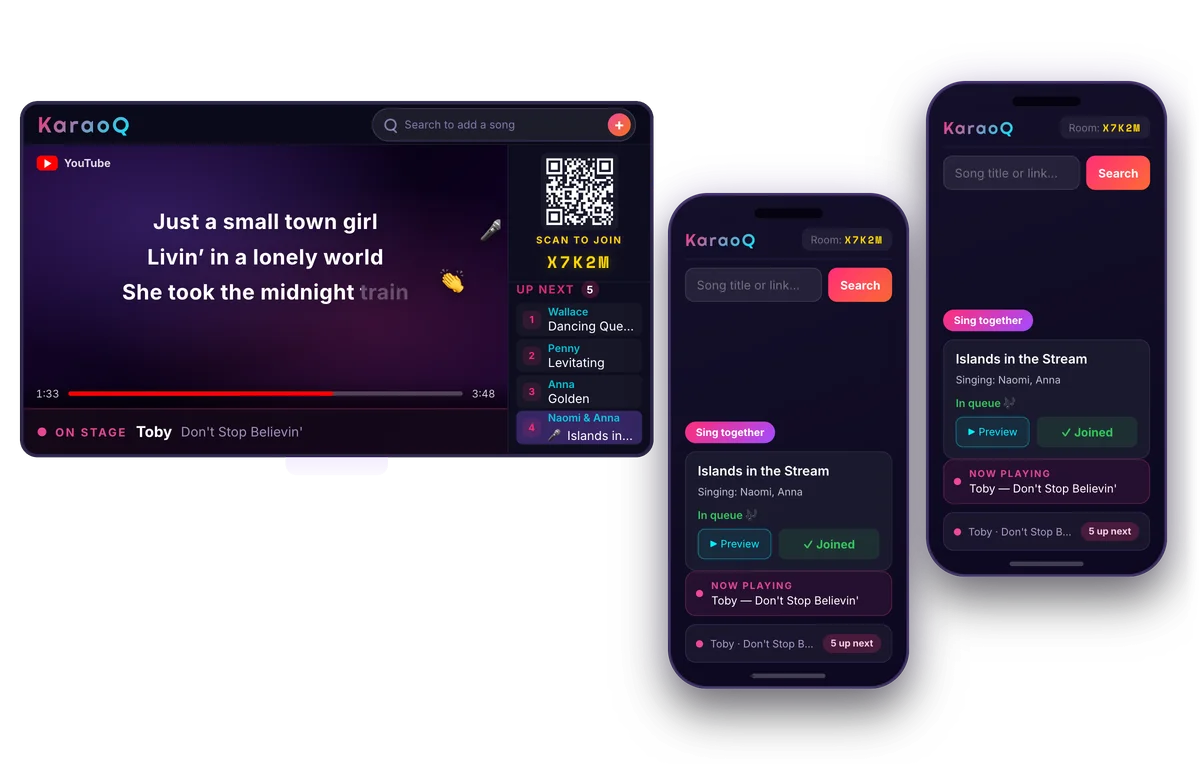
Create a room and print or display the QR code and join code. Guests scan it from anywhere in the room and join instantly — no app to download and no account to create.
What a KaraoQ night looks like: the queue on the big screen, everyone adding songs from their own phone. No app, no sign-up. Start a room, it's free Let guests queue their own songs
Everyone searches YouTube and adds songs from their own phone. The shared queue keeps every turn in order, so staff never have to run a paper list or babysit a laptop.
Show the lineup on your screens
Cast or plug KaraoQ into the venue's TV or projector. The screen shows the current singer, the lyrics, and who's up next, so the whole room can follow along.
Keep the energy up with reactions
Guests cheer and react from their phones, and reactions light up the screen in real time. It turns a quiet open mic into a room that's actually into it — with no extra staff.
KaraoQ is free to run and needs no dedicated karaoke machine, so it works just as well for a weekly bar night, a private party, or a one-off event. Set up a room, share the code, and let the room run its own karaoke.
Ready to start?
Create a room and share the code — your karaoke night is one tap away.