KaraoQ Guide
How to host karaoke at home
You don't need a karaoke machine, a subscription, or a stack of discs to throw a great karaoke night at home. With KaraoQ, any laptop, tablet, or phone becomes the whole setup: you search YouTube for the songs everyone already loves, guests add them to a shared queue from their own phones, and the lyrics play on whatever screen you have. Here's how to set it up in a couple of minutes — and the small things that make the difference between a quiet room and one that won't stop.
Updated September 2026
Set up the room before anyone arrives
Put the lyrics on the biggest screen in the room and face the seating toward it — people sing along when they can read the words from the couch. If you have any speaker with an aux input, plug it into the laptop's headphone jack rather than relying on the TV's speakers; it's louder, fuller, and it keeps the music in time with the words. Leave a clear spot in front of the screen for the singer. That's the stage.
Dim the main lights and leave a lamp on. It sounds trivial and it's the single biggest lever for getting shy people to sing — nobody wants a spotlight in a bright kitchen.
Do you need a microphone?
For eight people in a living room, honestly no — a first night with no mic works fine and costs nothing. A mic changes the feel from 'singing along' to 'performing', which is what you want once people are into it. The cheapest good option is a wireless karaoke mic with its own built-in speaker; the best value for a real party is a Bluetooth party speaker with a mic input and a wired mic plugged into it.
Whatever you choose, the microphone goes into a speaker, never into the TV or the phone — that's the one rule that keeps the singer's voice in sync with the music. The gear guides below cover the rest.
Running the night so it never stalls
Seed the queue with three or four crowd songs before guests arrive so there's never a silence while people decide. Sing the first one yourself, badly — it sets the bar at exactly the right height. Encourage duets and group songs early; a nervous singer will join a chorus long before they'll take a verse alone.
Keep the queue fair. Because everyone adds from their own phone, the order takes care of itself, and the screen shows who's up next so people can get a drink and be back in time. If a song is dragging, skip it from your phone — nobody has to walk up to the screen.
Step by step
Open a room on any device
Go to KaraoQ in your browser and create a room. There's nothing to download and no account to make — you get a short join code and a QR code straight away.
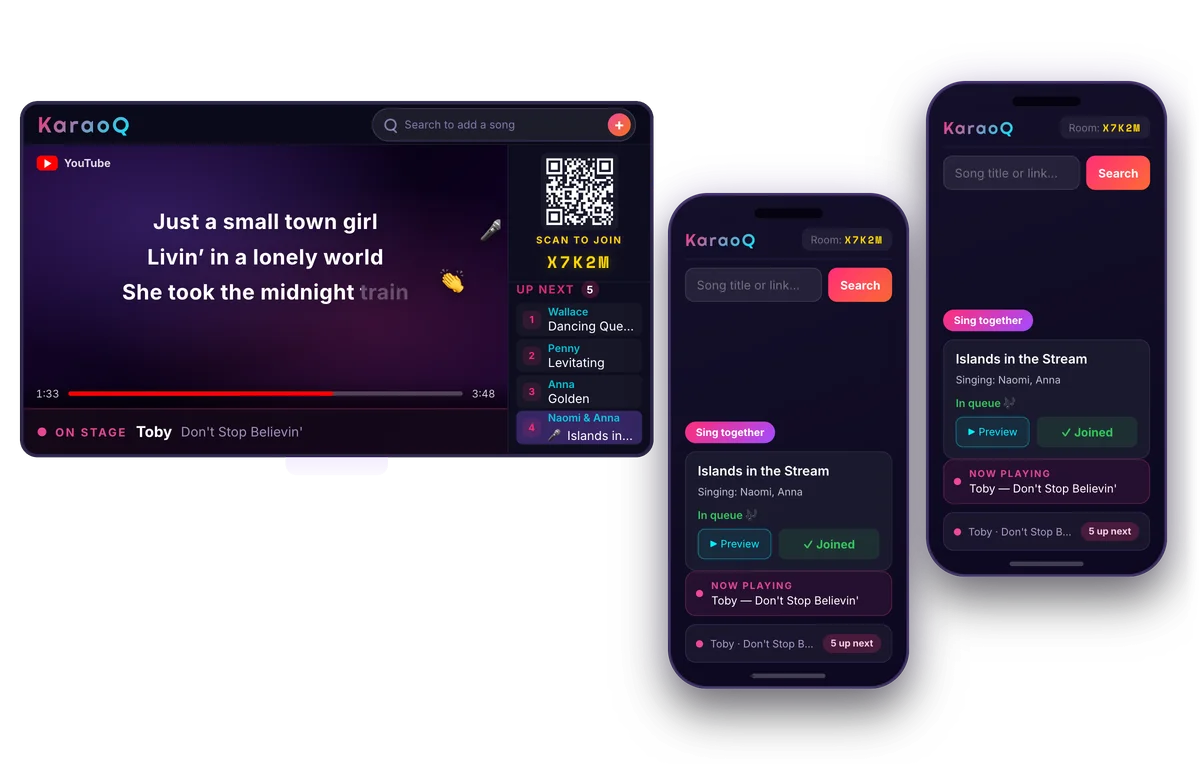
What a KaraoQ night looks like: the queue on the big screen, everyone adding songs from their own phone. No app, no sign-up. Start a room, it's free Share the code so guests can join
Show the QR code or read out the room code. Guests scan or type it on their own phones and they're in — no app, no sign-up, and nothing to set up on their end.
Build the queue from everyone's phones
Everyone searches YouTube from their phone and adds songs to one shared queue. KaraoQ plays them in order, so there's no fighting over the laptop and no one hogs the mic.
Put the words on the biggest screen
Open KaraoQ's display in your smart TV's browser, cast it with AirPlay or Google Cast, or plug in with an HDMI cable. The TV shows the song and lyrics while you keep the controls on your phone.
Frequently asked questions
- How do I do karaoke at home without a machine?
- Open KaraoQ in a browser, create a room, and put the display on your TV — via the TV's own browser, casting, or an HDMI cable from a laptop. Songs come from YouTube, guests queue from their phones, and the lyrics show on the screen. A karaoke machine's only remaining job, the speaker and mic, is optional.
- How many people does it work for?
- From two to a full house. Everyone joins from their own phone with the room code, and the shared queue keeps turns in order however many people add to it. For more than about fifteen, a speaker with a mic input becomes worth it so the singer can be heard.
- Does it work with kids?
- Very well — kids love queuing their own songs from a phone or tablet. Search results come from YouTube's karaoke channels, and the host can remove anything from the queue on their phone. A pair of wireless karaoke mics with built-in speakers is the classic kids' addition.
- What does it cost?
- Nothing. KaraoQ is free to host and free to join, there's no app to buy and no account to make, and the songs play from YouTube. If you later want a speaker and mics, the cheap setup guide below shows what's worth buying and what isn't.
That's it — no machine, no library, no clutter. As long as one device has a browser and something that makes sound, you can host karaoke anywhere: a living room, a dorm, a backyard, or a hotel room on a trip.
Ready to start?
Create a room and share the code — your karaoke night is one tap away.