What's new
Put your room on a TV with a 6-digit code
Started the night on your phone and want it on the TV? Skip typing a link with the remote: the TV shows a code, your phone enters it, and your room is on the big screen.
Show a code on the TV, type it on your phone
Open karaoq.live in your smart TV's browser and choose “Already started on your phone?” The TV shows a 6-digit code. On your phone, tap Connect it under Start a Room and type the code. The TV switches to your room's display, with the queue and the QR code for guests, and your phone stays the host.
Each code works once and expires after 10 minutes. Starting fresh on the TV works as before: choose Start on this TV, then scan the QR code with your phone.
Connect a TV partway through the night
Already hosting? At the top of the host page, tap the button that shows where the video plays (a screen icon on a phone) and choose Connect a TV with a code. Enter the code from the TV and the videos play there. The queue, singers and settings stay as they are.
A host page that fits a TV
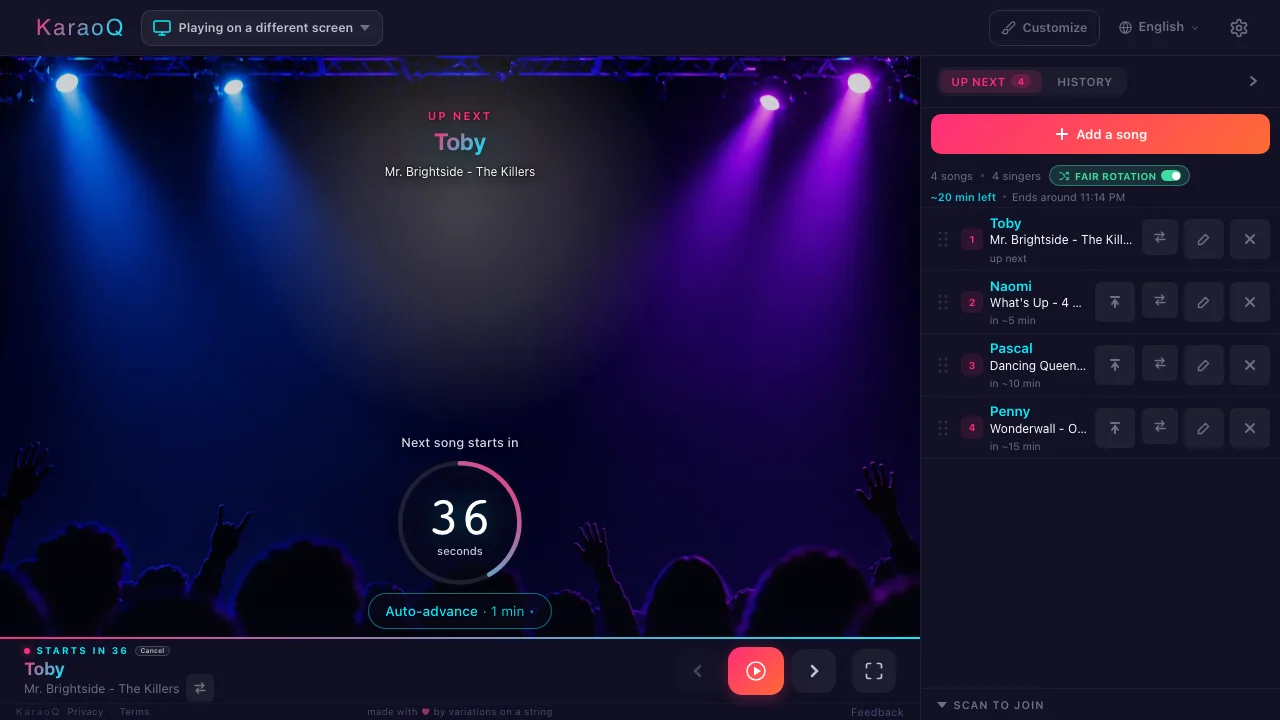
Running the night from the TV itself? The host page now fits the screen: the countdown sits clear of the play controls, and the queue shows at least four songs at once, with swap, edit and remove buttons on every row.
Go deeper: How to do karaoke on your TV
Ready to start?
Create a room and share the code — your karaoke night is one tap away.